Incident reporting software: how does AI sort and prioritize requests?
Monday, 9:30 a.m. The air conditioning in the Rivoli room has stopped working. Three employees report it: one by email, another through the form under the "Other" category, the third by stopping at reception.
The facility manager receives three requests. None of them mentions the floor, and only one is filed in the right place. Everything has to be requalified by hand before the contractor can be called. Meanwhile, the 10 a.m. meeting is looking for another room.
Incident reporting software should not be judged by how many tickets it logs, but by how well it sorts them. Here is how AI qualifies, prioritises, groups and routes each request, and what to prepare so it does the job well.
Manual triage: what the form leaves to the facility manager
A traditional reporting form shifts the workload. The employee fills in fields, then the facility manager checks, corrects and completes every ticket.
Wrong categories, vague locations
An employee doesn't always know whether a smell is a cleaning, plumbing or ventilation issue. They pick the vaguest category, or the first one on the list.
Location raises the same problem. "Near the cafeteria" or "in the big meeting room" is not enough for a technician who doesn't know the building. The facility manager calls back, waits for an answer, then passes it on.
Incidents that never get reported
When reporting takes time, many people give up. On the IT side, Buchanan Technologies' 2026 IT Experience Gap report shows that 82% of employees have decided at some point that a problem wasn't worth reporting.
The same report finds that 55% of respondents have to explain their problem again every time it is passed between channels or support levels. Facilities teams know this scenario well: the ticket arrives incomplete, and every exchange adds delay.
The result: small issues pile up unnoticed, while visible failures generate duplicate tickets.
Qualify every request: category, location and topic from the moment it is reported
With AI, qualification no longer depends on the employee. They describe what they see in their own words, and the software works out the ticket fields.
Understanding a sentence instead of a form
"There's water on the floor in the 3rd-floor toilets" already says it all: a category (plumbing), a location (toilets, 3rd floor) and an implicit level of urgency. AI reads the sentence, typed or spoken, and fills in the ticket from it.
A photo can complete the description. The technician sees the actual situation before going on site.
Splitting several topics in one sentence
Employees often report everything they notice at once: "the air con isn't working and there's a stain on the carpet". That is two incidents, two trades, two contractors.
AI splits the request into two separate tickets, each with its own category and priority. If the sentence is ambiguous, it asks the employee a question before creating anything.
Recognising the location without asking again
When the space directory is up to date, AI recognises a room mentioned by its name or number. The ticket arrives with its location, with no further back-and-forth with the person who reported it.
Prioritise requests: deal first with what disrupts the site
Not all incidents carry the same weight. A water leak near an electrical panel comes before a burnt-out bulb in a corridor.
Assigning a priority as soon as the ticket is created
AI assigns a priority based on the nature of the incident and what the employee says. "Needs fixing quickly", "we can't use the room anymore" or "it's leaking" are signals that a drop-down menu never picks up.
The facility manager opens the console and finds tickets already sorted. They decide on borderline cases instead of triaging the whole queue.
Grouping duplicates before they overwhelm teams
An air conditioning failure in a shared meeting room can generate five reports in a single morning. Without grouping, that means five tickets, and sometimes two call-outs for the same problem.
AI spots reports that relate to the same incident in the same place. It suggests merging them to the facility manager, who approves in one click. Technicians only come out once.
Route tickets: send every request to the right team, in its own tool
A well-qualified ticket is useless if it sits in the wrong queue. Routing decides who handles it, and in which system.
External contractor or in-house team
Several service providers often work on the same site. HVAC and plumbing are usually covered by a multi-technical maintenance contract. Cleaning, minor repairs or furniture sometimes stay in-house.
Routing follows this organisation. Each category is linked to a team, and the ticket goes straight to the right place, with no re-entry.
Building on the tools already in place
Contractors work in their own CMMS, and there is no question of imposing another one on them. Incident reporting software must therefore connect to these tools rather than replace them.
This is also one of the main barriers to AI in buildings. According to Eptura's 2025 Workplace Index, 50% of organisations cite a lack of AI skills and poor integration between platforms as major obstacles.
Useful AI fits into your existing contracts and processes. It doesn't redesign them.
Keep control over AI: the facility manager decides, the employee confirms
Automating triage doesn't mean letting AI decide alone. Three human checkpoints keep the system reliable.
- Requests that aren't understood go to a "To qualify" queue. The facility manager completes the ticket or asks the person who reported it for more details. No request gets lost.
- Duplicate merges are suggested, then approved by the facility manager.
- Closure only happens once the employee has confirmed. A ticket isn't closed because the contractor says so, but because the problem is solved.
This last step also feeds performance tracking: the rating left at resolution measures service quality, site by site and contractor by contractor.
What to set up before launch
AI sorts requests better when your organisation is clearly described. In many companies, this information already exists, but it is scattered across a maintenance contract, a floor plan and the team's memory. It is worth pulling it together with your facilities team and contractors before going live.
- Categories: aligned with your contracts (HVAC, plumbing, electrical, cleaning, furniture…), so that every ticket matches a service provider.
- The space directory: room names and numbers, floors and zones, as employees actually refer to them day to day.
- The routing table: for each category, the in-house team or contractor responsible, and the CMMS to update.
- Priority levels: what counts as urgent on your site, and the response times set out in your contracts.
- Closure: who confirms the resolution, and within what timeframe.
These settings are then fine-tuned over the first few weeks, based on the tickets actually received.
SaaSOffice: NOVA sorts every report from a single sentence
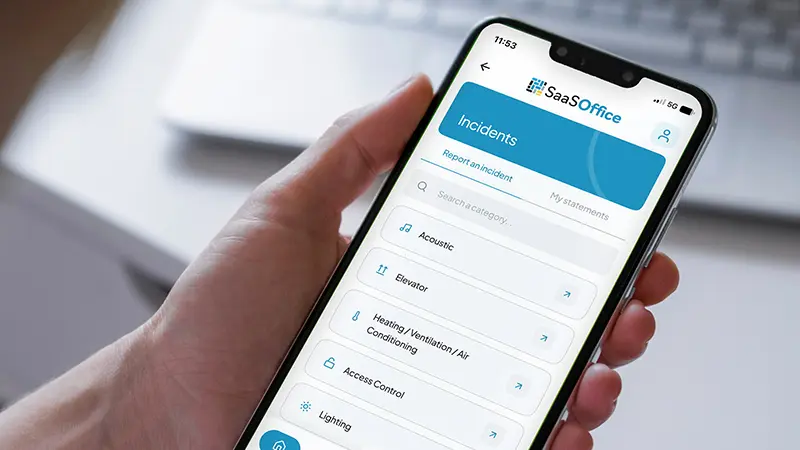
At SaaSOffice, the AI assistant NOVA handles triage from the moment an incident is reported. The employee opens the app and speaks, for example: "Rivoli room on the 4th floor, it's far too hot and a bulb has burnt out above the table."
NOVA transcribes the request, recognises the Rivoli room and creates two separate tickets. The first, for HVAC, is set to high priority. The second, for electrical, stays at medium priority. The employee can attach a photo, then follow their tickets in their incidents area, or simply ask: "What's the status of my ticket for the Rivoli room?"

On the facility manager's side, tickets arrive in the console already categorised, prioritised and located. If two colleagues reported the same air conditioning failure earlier that morning, NOVA detects it and suggests a merge. The facility manager approves in one tap.
Routing then follows your organisation. The HVAC ticket goes to your contractor's CMMS: SaaSOffice syncs with the leading systems on the market, such as those of Schneider Electric, Bouygues Énergies, Veolia or Engie Solutions. The electrical ticket stays in SaaSOffice's built-in ticketing, assigned to your operations team. The console tracks both flows in a single view.
Once the issue is resolved, the employee confirms everything is fixed and rates the intervention. These ratings feed the resolution NPS for each site and the quality tracking for each contractor, available in Reporting & Analytics.
To see NOVA qualify and route an incident from start to finish, visit SaaSOffice's Incident Reporting page.
In conclusion
A poorly sorted incident costs twice: requalification time for the facility manager, waiting time for the employee. AI takes care of triage from the moment the incident is reported. It qualifies, prioritises, groups duplicates and routes each ticket to the right team and tool.
The facility manager keeps control over ambiguous cases, and the employee confirms the resolution. Triage builds on your existing organisation: your categories, your spaces, your contractors and their CMMS.
To go further, our article on anticipating incidents shows how to spot failures before they are reported. Our complete guide to incident management in the workplace covers the fundamentals.
Want to see NOVA sort your own requests? In 30 minutes, we look at your sites and your contractors' CMMS, and NOVA handles an incident on one of your floors.
FAQ: sorting and prioritising incident reports
How does AI determine the priority of an incident?
It combines the nature of the incident with the words the employee uses. With SaaSOffice, NOVA assigns a priority as soon as the ticket is created, and the facility manager can change it from the console.
What happens if AI doesn't understand the request?
The ticket goes to a "To qualify" queue. The facility manager completes it or asks the employee for more details via NOVA. The request is never lost.
Can several incidents be reported in a single sentence?
Yes. NOVA splits a request covering several topics into separate tickets, each one categorised, prioritised and located. If anything is ambiguous, it asks a question before creating the tickets.
Do you need to replace your CMMS to automate triage?
No. SaaSOffice syncs with the leading CMMS on the market for your external contractors, and offers built-in ticketing for your in-house teams. Routing happens automatically based on the incident category.
Photo credit: peopleimages.com, LIGHTFIELD STUDIOS Nicholas Felix/peopleimages.com - stock.adobe.com